Archive note: Original wording and photograph, with spelling and grammar tidied. The February 2009 update and November 2008 tutorial are kept in their original order. Version and availability claims refer to those dates; old forum, contact and seller links are retained as text.
Updated 24th February 2009 – Unlock 3G iPhone Tutorial
Great news, it is now possible to unlock your 3G iPhone without the need for an “Unlock SIM”. The solution has been released from the iPhone Dev Team and it’s FREE. Their unlock Software is called YellowSn0w (YellowSnow) and it supports all software versions up to and including 2.2. You can read their blog HERE
Read a great tutorial on how to unlock your 3G iPhone for FREE at iClarified here
I have tested this personally on my own O2 UK 3G iPhone and it works great!
Note: The latest software version for the 3G iPhone is 2.2.1. It is not currently supported by YellowSn0w. But rumours have it that a new version of yellowSn0w is about to be released (version 0.98) which will work with 2.2.1. Keep an eye on the dev team blog for updates.
If you are already running version 2.2.1 and want to unlock it, then for now you will have to wait for YellowSn0w 0.98 to be released. Some “Unlock SIMs” do claim to work with 2.2.1 but I have heard mixed reports on their reliability (read tutorial below for more information on unlock SIMs).
UPDATE: There is no news from the iPhone Dev Team yet about unlocking version 2.2.1. So unlock SIMs are currently the only solution for this version. Please read my tutorial below for more details. Hopefully they will crack it soon….
If you have any questions about iPhone unlocking please post them in my new support forum here.
I have left my older tutorial below as it may become useful again when Apple release newer software versions that might require the use of “unlock SIMs” again.
Updated 27th November 2008 – (For Archive Purposes only)
So you want to know how to unlock Apple’s 3G iPhone? Well I will do my best to show you how.
Basic Facts about unlocking the 2G & 3G iPhone
This tutorial is aimed specifically at the 3G version of the iPhone. If you have a standard 2G iPhone it can be easily unlocked using the USB cable provided with your iPhone. Have a read of the guide in the link below:
iclarified.com unlock 2G iPhone Guide (does not work for 3G iPhone)
If you know of a better guide to unlock the 2G iPhone, contact me. I will post a link to it here.
iPhone Unlock SIMs
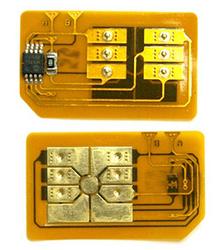
Sadly the unlock solution for the 3G iPhone is not so neat. As of November 2008 there is no software-based solution to unlock your 3G iPhone. But don’t worry, some clever people have discovered an alternative method. It is through the use of what is commonly referred to as “Unlock SIMs” or “piggyback SIMs”. Have a look at the picture to the right to see what they look like (there are different variations but they all look pretty much the same).
Now these unlock SIMs are very thin and you simply need to place them on top of the actual SIM card you would like to use in your iPhone. Finally place them into your SIM holder and then into the iPhone. It’s probably easier to see this in action. I found this great American video on You Tube that shows you exactly how it works.
Original YouTube demonstration
Looks quite straightforward doesn’t it? I have personally tested a few different types of these Unlock SIMs and the quality varies greatly. Some are very poor and simply do not work, others are great and work perfectly.
The technology and software on these unlock SIMs is continually being worked on and improved so it is important that you are buying the latest versions of these SIMs.
Do I need to cut my SIM card?
No you don’t. The older designs did require you to cut into your SIM card. The newer designs have moved the small IC chip to the other side. This means they will now fit into your iPhone without any cutting of your actual SIM.
Will they work with all iPhone software versions?
Until recently the answer to this was yes. But Apple have just released an update (Nov 2008) which has stopped most of the unlock SIMs from working. This latest software release for the 3G iPhone is Version 2.2. When you connect your iPhone to iTunes you will be prompted to upgrade if an update is available. So it won’t be long until most 3G iPhones out there are running this new 2.2 version. Software versions older than 2.2 are no problem for most of the reputable Unlock SIMs out there. But if you have version 2.2 you must be very careful when buying an unlock SIM.
How do you check your iPhone software version?
Easy: simply select “settings -> General -> About” from the main menu. You will see the version number in the list. Or you can simply dial *3001#12345#* and then press the call button.
Good News – V 2.2 can be unlocked with the latest SIMs
A friend of mine was using an unlock SIM in his iPhone happily for the last few months. Until he updated his 3G iPhone software to V2.2 using iTunes. As soon as the update was complete his iPhone displayed “No Service” instead of the signal strength. This is because Apple have improved the baseband security features in this new release. No damage has been done to the iPhone, it will still work with the correct SIM, but not with the “unlock SIM”.
Thankfully the various makers of the unlock SIMs have been busy working on a solution. The good news is that the very latest versions of these SIMs will work with version 2.2!
So where can I buy these latest SIMs from?
I am currently compiling a list of links to good sites that sell these. Check back soon or contact me.
The first company to officially support the new 2.2 version is “Any Network”. Click the link below to visit their site. They have a good reputation but are very expensive!
Any Network – iPhone 3g unlocking
Other Unlock SIM manufacturers to look out for include: YesSim, Any Network, Rebel SIM, Universal SIM, Tornado SIM, Turbo SIM and X-SIM. These unlock SIMs are also available for other handset manufacturers such as Nokia, Samsung, Sony etc. So make sure you buy the iPhone version!
Be careful Unlock SIMs can get stuck in your iPhone!
During my own testing of these SIMs I did manage to get a couple jammed in the 3G iPhone. The newer versions are less prone to jamming but it can still happen. If you are unfortunate enough to get your unlock SIM stuck then you have a few options. If you’re feeling brave and are technically minded then you can open up your iPhone (the 3G version is actually very easy – much easier than the 2G version). Have a look on You Tube for videos on how to do this. Option two is to use brute force. This method usually results in a broken SIM tray (you can buy replacements from eBay). Normally the SIM release mechanism will also break but you can still remove the SIM tray using a pin. My advice is prevention is better than cure. Some newer unlock SIMs come with special SIM trays to accommodate both your SIM and the unlock SIM. Other preventative methods include sticking the unlock SIM to your actual SIM with either special glue or tape. I will write a tutorial on how to open your 3G iPhone at a later date.
What About Jailbreaking / Jailbreak?
This is completely different to unlocking and is out of the scope of this tutorial. I will write a separate guide at a later date. In the meantime, I can confirm that you can jailbreak all software versions of the iPhone (both 2G and 3G). Visit iClarified.com to see many tutorials on how to do this,
I will do my best to keep this section up to date – Many thanks for reading – Dan
Finally if you are a webmaster please do not steal my content without permission. If you do take it without permission please at the very least link back to my site.