Archive note: Original wording and images, with spelling and grammar tidied. Compatibility, prices and statements such as “all existing Nokia models” describe the period when this was written. Old software-download and seller references are retained as text.
If you want to unlock one of the following Nokia handsets:
1100, 2300, 3100, 3200, 3300, 3510, 3510i, 3650, 3660, 5100, 6100, 6220, 6230, 6310, 6310i, 6510, 6600, 6610, 6650, 6800, 6810, 6820, 7200, 7210, 7250, 7250i, 7600, 7700, 7650, 8310, 8910, 8910i, N-GAGE
Then you can do this for free and it will only take a matter of seconds! You do not need any equipment or data cables. Take 5 minutes to read through the following section called – Remote Unlocking .
Remote Unlocking
Remote unlocking has now become the most common way to unlock your Nokia phone. This is because it is so simple and no data cables are required at all! All you need to do is type a specially calculated code into the phone! It’s that simple!
How does remote unlocking work?
You will need to know the following:
1) The model of your handset (7210),
2) The handset’s specific serial number (IMEI number – 15 digits long)
3) Which network the handset is locked to!
IT IS VERY EASY TO UNLOCK YOUR PHONE USING UNLOCK CODES, IN FACT THIS IS HOW THE NETWORKS THEMSELVES UNLOCK HANDSETS!
Remote Unlocking Tutorial! (updated 20/1/04)
So you fancy generating your own unlock codes? And why not? You can make a few quid by selling unlock codes to friends and family etc. Recently the software that generates these unlock codes has become available for FREE!!!!!!!!!!!!!!!
Read My Step by Step Remote Unlocking Tutorial Here!
Free software (JIC Unlocker)
At present the most mainstream DCT4 unlocker is a piece of software from JIC. This unlocker was actually stolen from a company called JIC Electronics a little while back. It is very easy to use as it consists of only one button!
Nokia are continually improving the software within their handsets. Mainly these improvements consist of small bug fixes but recently Nokia improved the service provider lock protection.
What this means is that if your handset has a later version of software it may be more difficult to unlock. (You can check your software version by typing
*#0000# into the phone’s keypad)
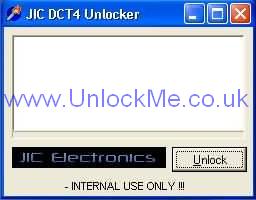
Download the JIC DCT4 Unlocker
This software works on all operating systems, BUT on XP you may need to right click the executable file, select properties and change the compatibility mode to Windows 98.
JIC software works 100% with pure M-BUS cables and does not work with M/F-BUS cables. (The software can’t put the phone into test mode when using M/F-BUS cables). But there is a way to make the program work with auto-switching M/F-BUS cables, so read on!
What if you have an M/F-BUS?
If you have an auto-switching M/F-BUS cable then as mentioned above you cannot use the JIC unlocker. The reason for this is that the program fails to put the phone into test mode. So before you can use the JIC unlocker you must use another piece of software to send your phone into test mode. Download and unzip DCT-4 TestMode By SAJ1UK
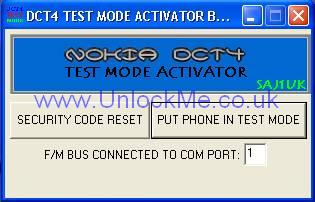
Connect your handset to the M/F-BUS data cable and run DCT-4 Test Mode By SAJ1UK. Press the button “Put Phone in test mode”. After a few seconds the phone should display the words “Test mode” on the screen. With the phone now in test mode you can exit from the Test Mode program and run the JIC unlocker. (leave the phone connected to the cable at all times)
When you click the unlock button on the JIC program the phone is already in test mode therefore the program can now successfully unlock your handset.
What software versions can be unlocked using the JIC Software?
The JIC software can unlock the following software versions:
3510: All versions
3510i: None
6310: All versions
6310i: All versions up to but not including 5.10
6510: All known versions
7210: None
7650: None
8310: All versions up to but not including 5.57
8910: All known versions
NOTE: 6610 and newer models CANNOT be unlocked using this software
Unlock clips
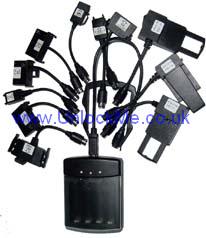
These are very clever yet very simple devices which can be used to unlock ALL existing Nokia models. No PC is required, just connect the phone to the clip using one of the provided adapters. Absolutely no knowledge about unlocking or mobile phones is required
These clips are constantly updated to unlock the newer software versions. The latest variety of these DCT3 +DCT4 clips will even unlock the 7650!!!
You must be very careful when purchasing unlocking clips. Do not buy the older varieties which are now limited in the software versions they unlock.
Always ask for details of what can and can’t be unlocked with the clip you are buying!
Where to buy unlock clips?
These latest clips now unlock ALL existing Nokia handsets (DCT3 and DCT4)
These ‘super clips’ auto-detect the model (whether it is DCT3 or DCT4)! They normally come with 11 connectors and a 7650 opening tool! (so check before you buy!)
These new auto-detecting ‘super clips’ can be purchased from:
No seller link was included in the saved original page.